Getting Started with Discussions
Discussions in Brightspace can be open to the entire class or restricted to smaller groups. Group discussions can be set up in two ways: each group can discuss the same topic in a private setting, or different topics can be assigned to different groups. Also, when teaching a course with combined course sections, section-specific discussions can be created. Instructors can also create discussions where students can post anonymously.
Note
Students are not able to create discussion forums or topics. Instructors need to structure the discussion area for students.
Benefits of Using Discussions
There are many benefits of incorporating discussions into a course. Discussions can:
- promote communication and collaboration among students,
- provide a platform where students can learn from each other and co-create knowledge,
- give each student an equal opportunity to share their ideas,
- provide a comfortable place to share ideas to shy or introverted students, who may be reluctant to speak in a classroom,
- allow students to practice writing skills (although they should not be treated as writing assignments but dialogues).
Discussions Terminology
Forum
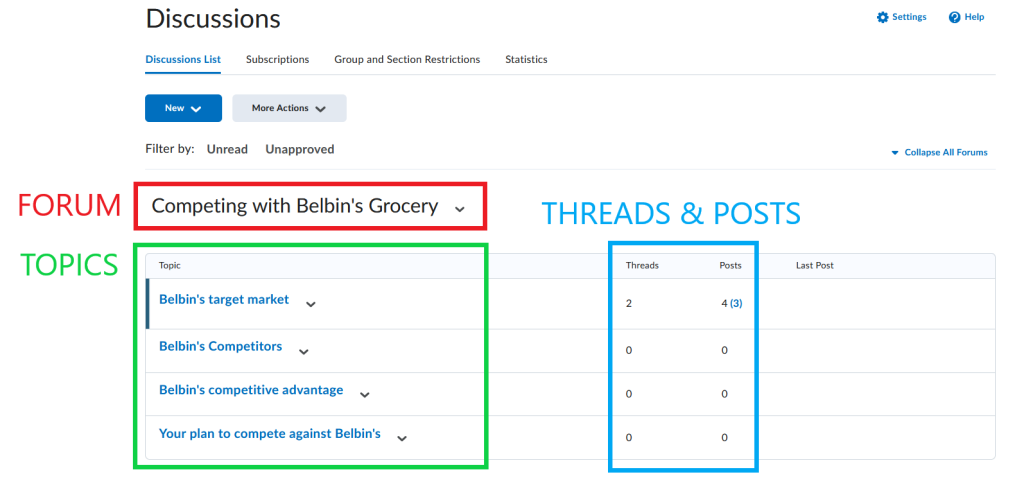
- A forum is a collection of related discussion topics, similar to Category in Assignments and Quizzes.
- There may be several discussion forums in a course, and each forum may contain one or several topics.
- A forum cannot be graded, and thus it cannot be linked to the grade book.
- A forum cannot have a rubric attached to it.
- Students cannot post in a forum unless it contains a topic.
Topic
- A place where students post their responses to a question/prompt and reply to other students’ posts.
- Once a forum is created, an instructor has to add a topic (or multiple topics) to it.
- Topics have to be created within a forum – they cannot exist independently.
- Topics can be graded, and can be linked to the grade book.
- A rubric can be attached to a topic for evaluation purposes.
Thread
- A thread is created when a student posts in a discussion topic. A discussion thread consists of the original post along with any replies to that post.
- There are often multiple threads per topic (each student may start their own thread).
Reply
- A response to another student’s post in a thread.
Post
- Any message posted in a thread.
Note
Students cannot create discussion forums or topics. They can only start threads and reply to posts. Thus, the discussion area has to be set up by the instructor.
The image below illustrates the different elements of a discussion in Brightspace.
Discussions FAQs
Can I create group discussions so that only specific students can see and post to a topic/forum?
Yes, you can restrict discussion forums or topics to specific groups of students. For information on how to create group discussions, please visit our page on Creating Discussions.
Can I lock forums or topics so that students can no longer post but can still see all the posts?
Yes. You can do it by setting an end date for a discussion forum or topic, after which the submission function will be disabled. For more information about availability dates and associated settings, please visit our page on Creating Discussions.
Can I use the discussion tool in my face-to-face course?
Sure, the Discussions tool may be particularly beneficial for:
- Large classes where students may not have the opportunity to interact with peers.
- Classes where time does not permit a high level of in-class interaction.
- Classes with a group work component so students have a shared space to work.
- Activities or questions that require the students to take time to develop a thoughtful response that would not be possible in a classroom.
- Courses that focus on current and emerging trends.
- Courses with students who may be more comfortable expressing their thoughts after having time to reflect.
- Students for whom English is a second language since the discussion allows them the time to compose their responses.
Should I respond to every posting in a busy discussion forum or topic?
No, you do not have to respond to every student’s posting. You should read the postings and either respond to specific students’ posts if you have a question, or post a summary of students’ posts that will help to guide the discussion further.
What is my role? How should I participate in the discussions?
This really depends on your course and the maturity of your students. Your role will vary tremendously when teaching a first-year course as compared to a graduate level course. You should participate enough so students know that you are interested but students should guide the discussion.
Can I see if students have read or posted in specific discussion forums and topics?
Yes, you can see students’ participation in the Discussions tool by clicking on the Statistics tab on the main discussions page.
Should I grade discussion posts?
Yes, definitely! Whether your course is face-to-face or distance, if you want your students to participate and use the discussions tool, there should be an evaluation component.