Managing Course Files
Manage Files is the central storage space for all course materials in Brightspace, allowing instructors to organize, upload, and manage course files behind the scenes. By creating a clear folder structure and maintaining files in one location, you can more easily build, update, and reuse course content across your course.
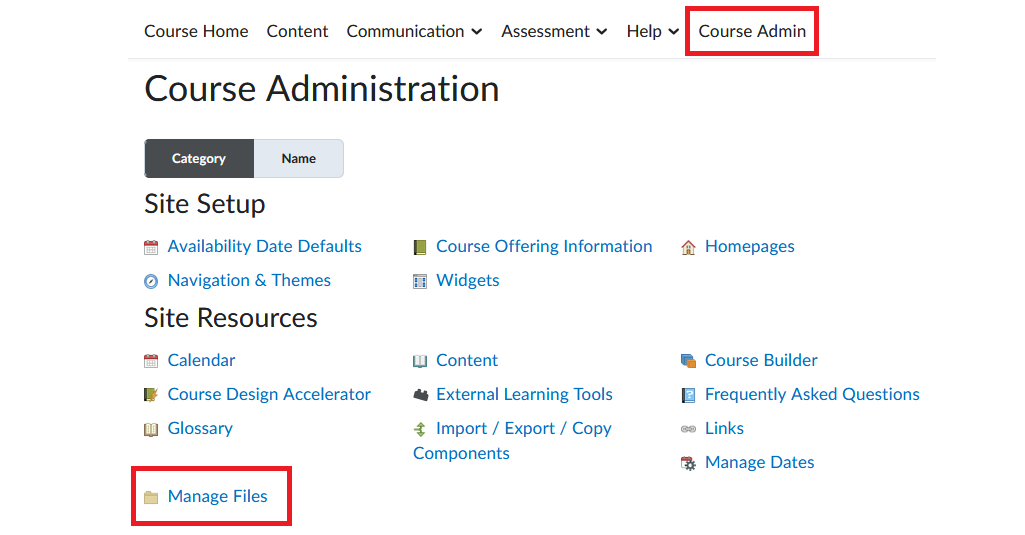
Manage Files is located under Course Admin in the course navbar.
Benefits of Using Manage Files
- Centralized file storage – All course files are stored in a single location, making it easier to view, update, and keep track of them.
- Improved organization – Files can be organized into folders (e.g., by module), making materials easier to locate when needed.
- Greater efficiency and reduced duplication – Files can be uploaded once and reused across the course, rather than uploading it multiple times.
- Simplified maintenance and updates – Managing files in one place makes it easier to update, replace, and maintain course content over time.
Adding Files to the ‘Manage Files’ Area
Files are added to the Manage Files area in two main ways:
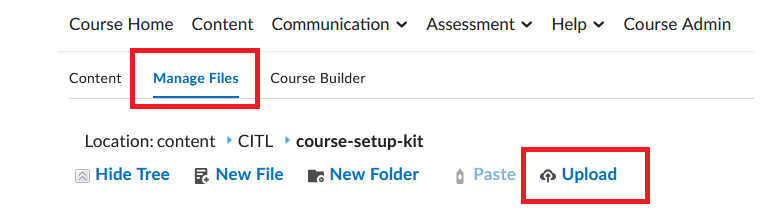
- You can upload files (or entire folders) from your computer directly to Manage Files using the Upload option. Then, organize your files into folders, the way you would on your computer.
- Files that you add to Course Content are automatically added to Manage Files and stored there. However, files added this way usually go into top-level folder in Manage Files, leaving them disorganized and more difficult to locate later.