Course Site Enrollment Tool
The Course Site Enrollment Tool, available through Brightspace, allows instructors to enroll others (teaching assistants, student auditors, other instructors etc.) in their course sites. Please note that only users with existing Brightspace accounts can be added using this tool.
Note
By enrolling someone into your course site, you are exposing your personal information and the personal information of your students to a third party. You are also providing access to your teaching materials and potentially academic submissions of students. It is important that you understand the risks before enrolling someone into your course site and ensure they are aware of their responsibilities with regards to your teaching materials and protecting student information. You can learn more about privacy policies and procedures from the university’s policy website. If you become aware of a privacy concern or privacy breach, it is your responsibility to report this to CITL and/or the Memorial Privacy Office.
Who can be added
- A teaching assistant (TA) – If you have a teaching assistant assigned to help you with your course, you can add them to your site using this tool.
- A student auditor – If you are allowing a student to participate in your course, but they will not be receiving credit, you can add that student yourself. This will grant the student permission to your course, but exclude the student from grading.
Before adding a student auditor, review the academic regulations regarding Auditing Students as outlined in Section 6.5.10 of the University Calendar. This section provides important details on the auditing process, including permissions required, eligibility, registration requirements, and related policies.
Note
If you need to add a student to your course for the purpose of grading, the student must complete the ‘add a course’ process through the Registrar’s Office, and the student will be added in an automatic update from Banner. If you need student access sooner, or have another student use case, please reach out to the CITL Support Centre to discuss.
- A student who needs extended access to your course – If you have approved a student to write a deferred exam, you can give that particular student extended access to your course material. This role bypasses normal end date restrictions on course sites, but otherwise is identical to a student role.
Who cannot be added
- Additional instructors – You should not add other instructors to your course site for two reasons:
- Instructor-level enrollments are done automatically based on information entered into Memorial’s Banner system. If you want to add another instructor to your course site, you should contact your academic support staff and request that the other instructor be added to Banner. If that isn’t possible, or if you are collaborating with an instructor external to Memorial, reach out to the CITL Support Centre with the details of your request. In most cases such requests can be fulfilled.
- Sometimes you may want to enroll another instructor into your course sites in order to share your course content with them. However, please note that this will give them access not only to your content, but also to student information and academic submissions. If you need to share content with another Brightspace user, reach out to the CITL Support Centre to discuss your options. There are a number of ways to accomplish this goal.
- Individuals external to Memorial – You cannot add an individual without a Brightspace account to a course site. If you want to add someone external to Memorial, please reach out to the CITL Support Centre with the details, and we will create accounts and complete the enrollment for you.
Roles explained
You can enroll users in Brightspace in a number of different roles. Each role has limits around what activities and tools can be accessed within your course site. The available roles are listed below:
- Student Auditor
- A ‘student auditor’ has the same permissions as a student in Brightspace, but cannot be assigned grades for submitted work and is not listed in the grade book.
- Appears on the classlist.
- Student Deferred
- A ‘student deferred’ has the same permissions as a student, except they have continual access to your course site after the end date of the course.
- This role only appears after classes have ended for a particular semester but before the exam period begins.
- Appears on the classlist.
- TA
- The TA role gives the user instructor-like access to some areas of your course site. TAs are able to assist in grading assessments, participating in discussions and viewing content.
- The TA role behaves like an instructor in some tools and like a student in others. You can view a complete list of what each role can on our role information page.
- Appears on the classlist under the TA tab.
- Enhanced TA
- The Enhanced TA is identical to the Instructor role in a course site and provides access to all tools and information contained within the course site.
- Appears on the classlist under the TA tab.
Note
You cannot use the Course Enrollment Tool to override any roles that are automatically assigned from Banner (students or instructors).
Enrolling a user
Before you can enroll someone in your Brightspace course site, you will need the following:
- Their Brightspace username (usually it is the first part of their MUN email address).
- Information about the course you are enrolling them in.
- The role you want them to have in the course.
Once you have that information, you can follow the instructions below.
- Log in to Brightspace.
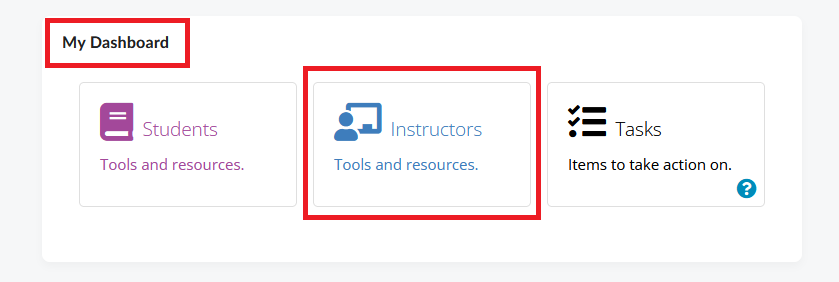
- On the homepage, locate the My Dashboard widget and select ‘Instructors’ .
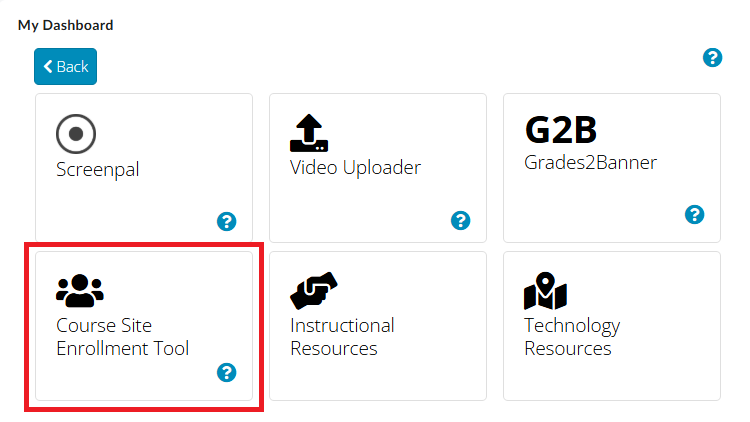
- On the next page, select Course Site Enrollment Tool.
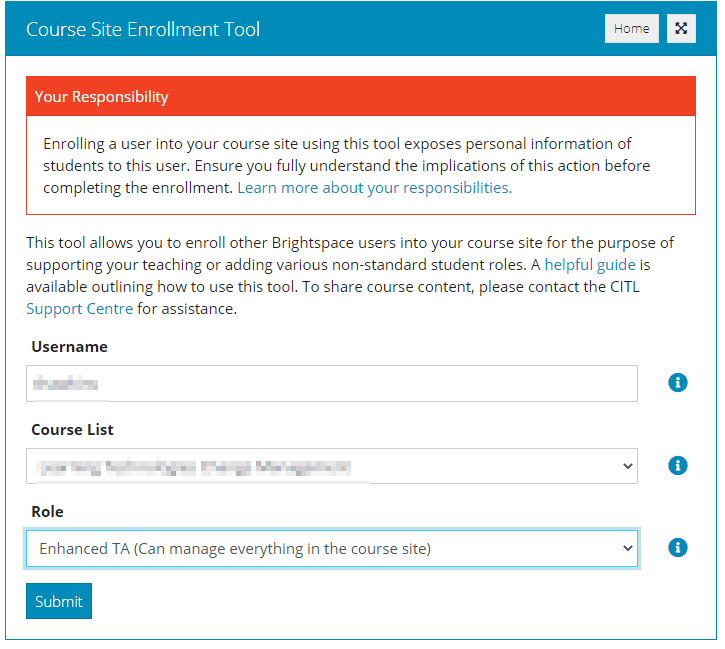
- Read the Your Responsibility section and the introduction.
- In the Username field, enter the MUN Login ID or Brightspace username of the user you want to enroll.
- Select the course you would like to enroll them in from the dropdown menu.
- Select the role for the user you are enrolling.
- Click Submit.
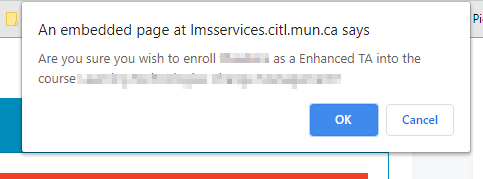
- A pop-up window with a summary of the enrollment will appear. Review the information and confirm the enrollment.
Un-enrolling a user
If you wish to undo an enrollment and remove a user from your course site, you can follow these steps:
- Log in to Brightspace.
- On the homepage, locate the My Dashboard widget and select Instructors.
- Select Course Site Enrollment Tool.
- Click the Show History button.
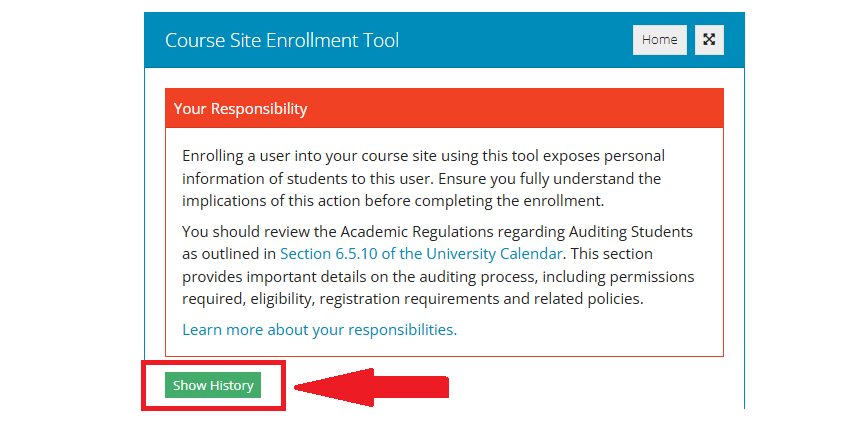
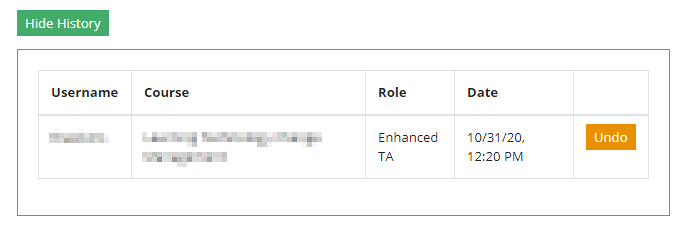
- A list of recent enrollments that you have completed through this tool will open.
- Find the enrollment you want to reverse and click the Undo button next it.
- A confirmation box will appear to confirm the unenrollment.
Frequently encountered issues
Username
In order to enroll someone into your course site, you will need their Brightspace username. This is most often someone’s MUN Login ID. The easiest way to collect this information is to ask the user for the username they use to log into Brightspace. NOTE: You need to collect a user’s true @mun.ca ID (e.g. zsm45@mun.ca) and not an alias (e.g. zoes@mun.ca). Aliases will not work in the enrollment tool.
Course List
You can only enroll other account users into courses where you are an instructor. You can find these courses in two locations on the Brightspace homepage:
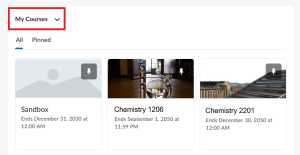
- In the My Courses widget, which contains your pinned courses
 followed by other courses according to the enrollment date (the maximum number of courses displayed here is 12).
- By clicking the Course Selector tool – the waffle icon on top of the page, which opens up a dropdown menu listing all the courses where you are an instructor.
