Class Progress Tool
The Class Progress tool is a feature in Brightspace that allows instructors to monitor each student’s activity in a course. From a single location, instructors can check, for example:
- which content topics a student has visited,
- how many discussion posts they have read and created, or
- how often they log in to Brightspace.
Using the Class Progress tool can assist instructors in:
- Tracking the performance of individual students (or the class as a whole)
- Helping identify learners who may need support
- Generating progress reports
- Reflecting on a course.
What can be monitored
Instructors can monitor student progress in 9 different aspects of a course. These aspects are called progress indicators and include:
- Content Completion – shows how many required content topics a student has completed, and how much time they spent on each topic (for more information on content tracking, please refer to the last tab on this page).
- Objectives Completion – if a course has objectives linked to it, this indicator shows which course objectives a student has achieved.
- Grades Performance – displays a bar chart representing student grades for the last 15 assessments, as well as the current final grade for each student.
- Assignments Performance – displays a bar chart representing grades for the last 15 assignments, as well as the average grade for all assignment submissions.
- Checklist Completion – if a course contains checklists, this indicator displays student progress through the checklists.
- Content Visited – shows which content topics students have accessed in the Content tool and how much time they spent on each topic.
- Discussions Participation – shows how many discussion posts a student has posted and read.
- Quiz Performance – displays a bar chart representing student grades on the last 15 quizzes, as well as the average grade on all quizzes.
- Survey Completion – displays students’ progression through the assigned surveys in the course.
In addition to course-specific information, the Class Progress tool can also be used to track:
- Login History – shows the number of logins to the Brightspace system (but not a specific course) over the last 30 days.
- System Access – indicates how many times a student has accessed the Brightspace system in the last 30 days.
Only 4 indicators can be displayed on the Class Progress overview page at one time. Thus, instructors should decide which four aspects of the course are most important for them to monitor and customize the progress indicator display accordingly (instructions can be found below).
Accessing the Class Progress tool
- Log in to Brightspace using your MUN credentials.
- Navigate to your course site.
- In the course navbar, go to Course Admin.
- Select Class Progress from the available tools.
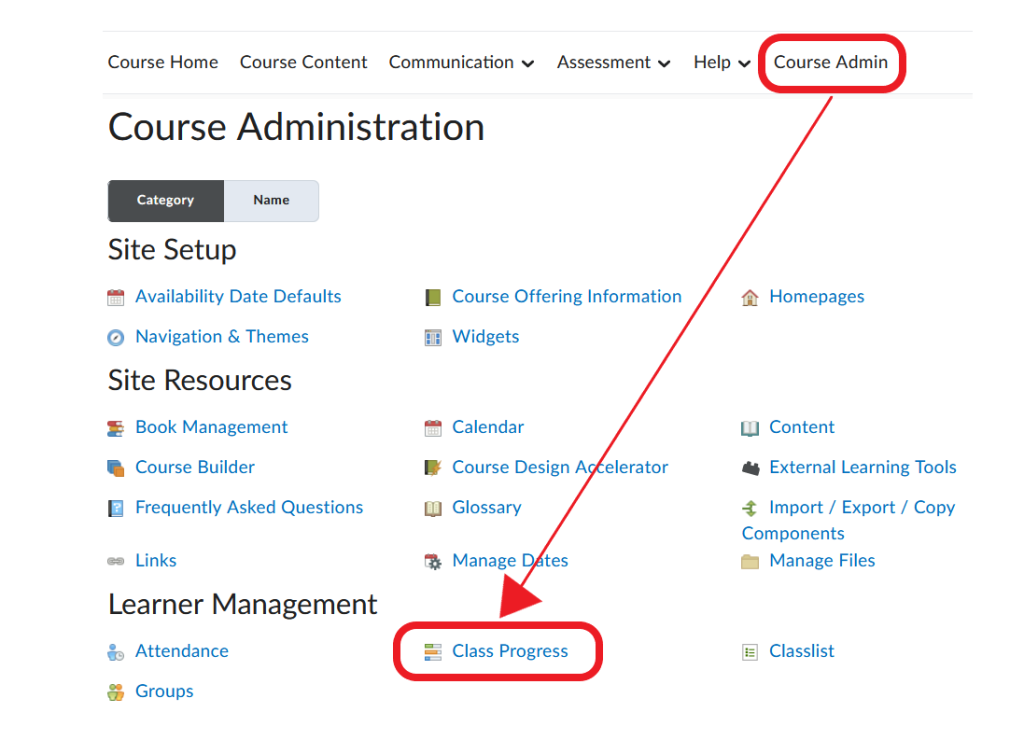
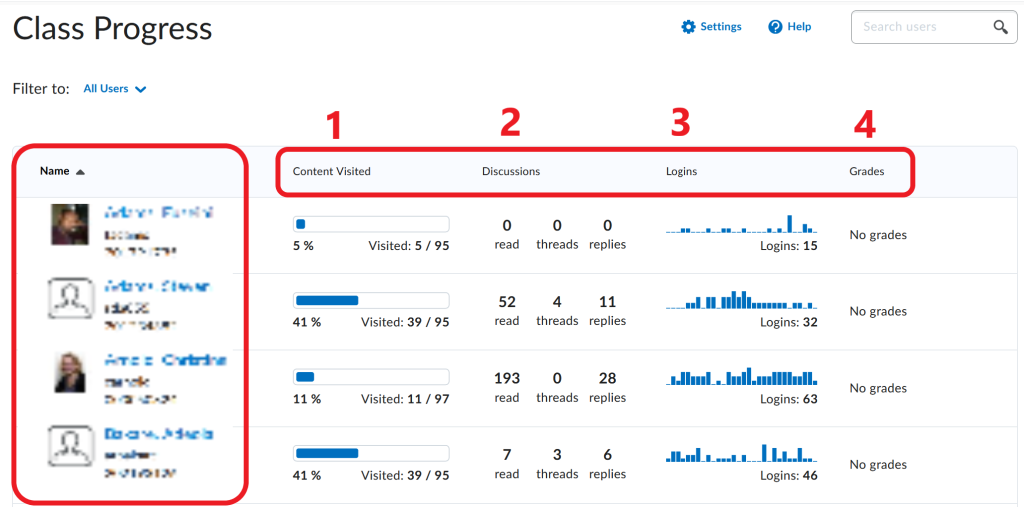
- The Class Progress tool will open. On the overview page, you will find a list of your students and their performance against 4 progress indicators.
Note
Only 4 progress indicators can be displayed on the overview page at one time. You can customize which indicators you want displayed based on your preferences (e.g., you can replace Logins with Quiz Performance). For instructions, please refer to the next tab in this resource.
Changing progress indicators
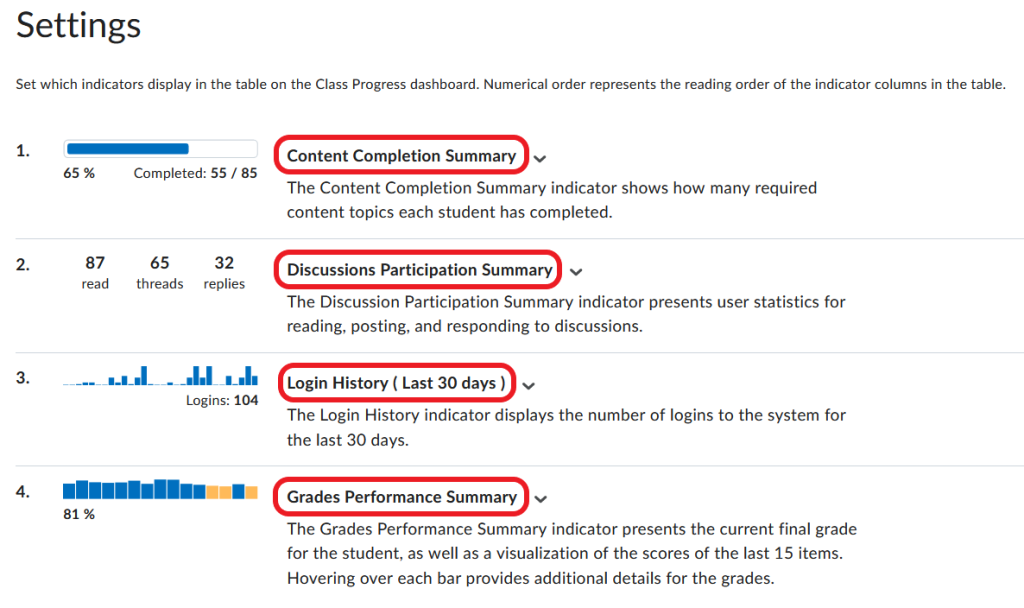
Only 4 progress indicators can be displayed on the Class Progress overview page at one time. If you wish to replace some indicators with others (e.g., remove Discussion Participation Summary and add Quiz Performance), proceed as follows:
- Log in to Brightspace using your MUN credentials.
- Navigate to your course site.
- In the course navbar, go to Course Admin.
- Select Class Progress from the available tools.
- On the Class Progress page, click Settings in the top right corner.

- On the Settings page, you will see a list of the four progress indicators currently displayed on your Class Progress overview page.
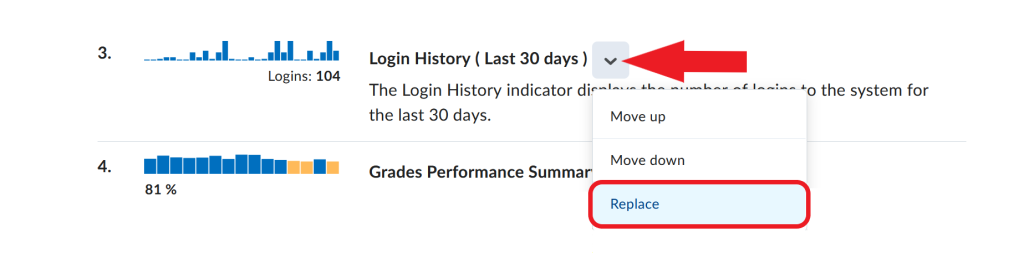
- Locate the progress indicator that you want to replace, and click the downward arrow next to it. Select Replace from the dropdown menu.
- A list of available progress indicators will open. Select the indicator you want to add to the overview page in place of the one you are removing.
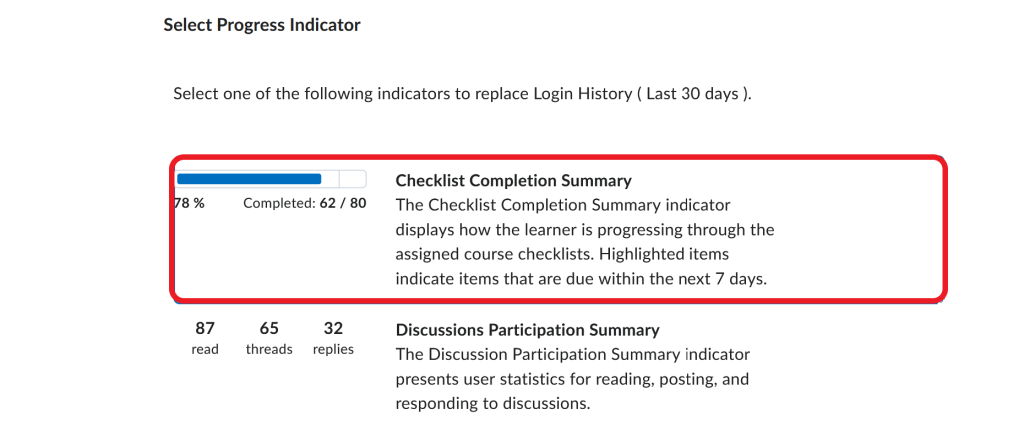
Click Save and Close.
Viewing student progress
In order to check how students have been engaging with different aspects of your course, begin as follows:
- Log in to Brightspace using your MUN credentials.
- Navigate to your course site.
- In the course navbar, go to Course Admin.
- Select Class Progress from the available tools.
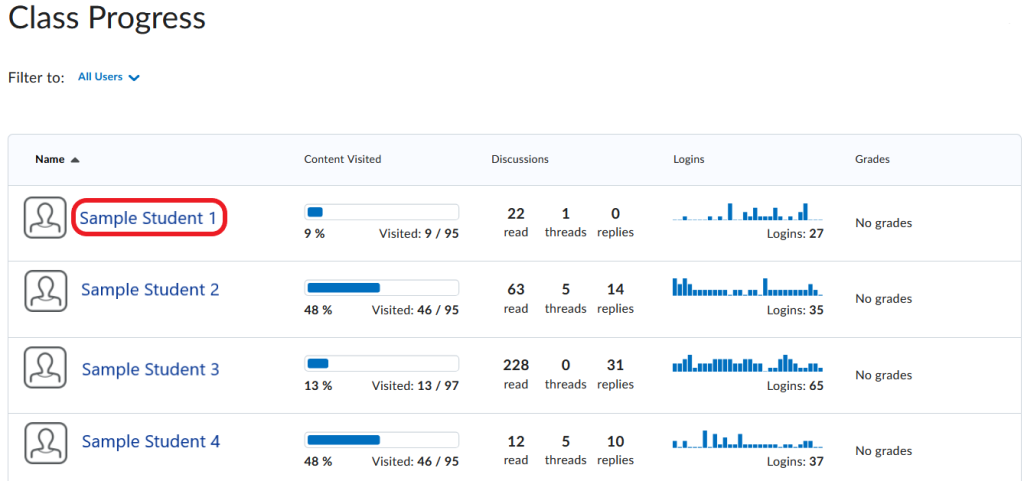
- On the Class Progress overview page, the student list is located on the left. In the centre, you can see a summary of each student’s performance against four progress indicators of your choice.
To see details on each student’s progress, you now have two options.
OPTION 1: Click on a student’s name.
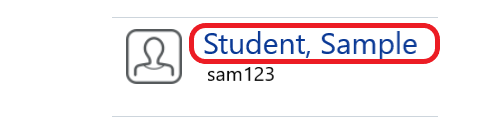
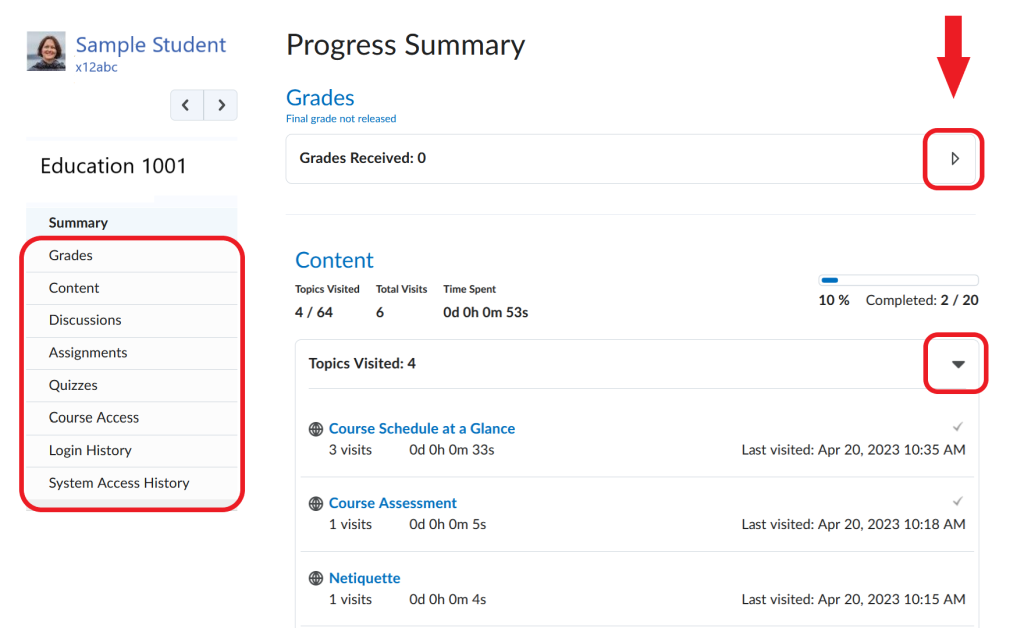
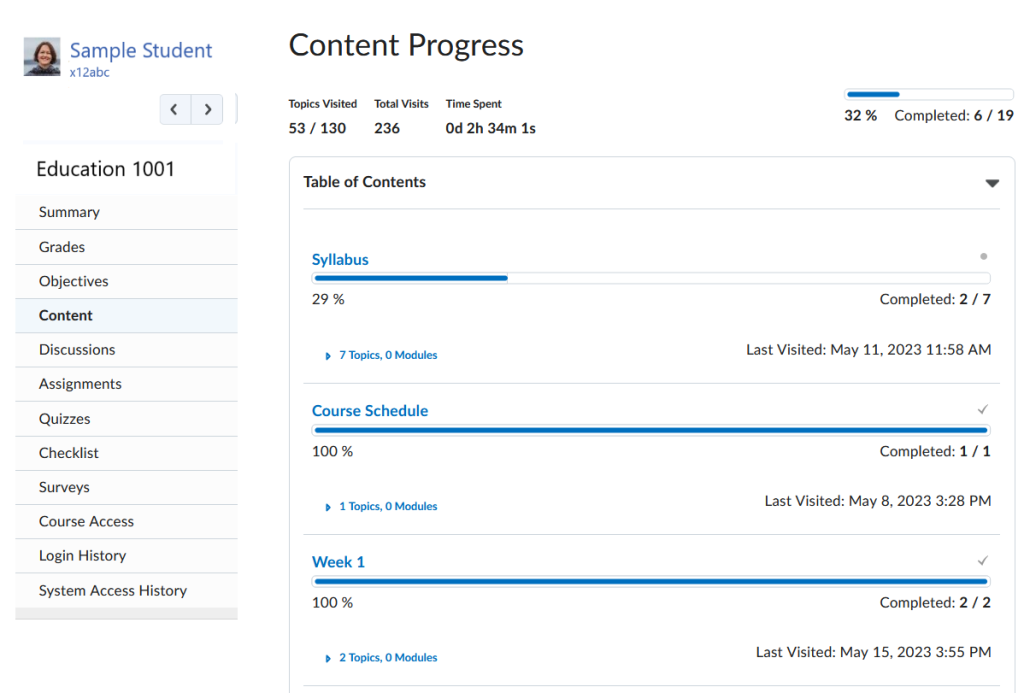
This action will bring you to the Progress Summary page for the selected student. The summary page displays a student’s progress against all progress indicators, not just the four indicators that are displayed on the Class Progress overview page.
To expand each section and view details, click the arrows on the right.
OPTION 2: Click on a specific progress indicator for a student.
On the Class Progress overview page, click on a specific indicator that you want more information about.
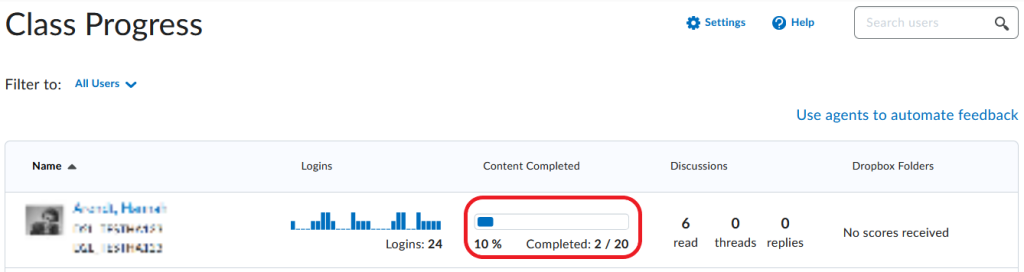
You will be taken to the student’s progress page for that specific indicator, where you can view additional details.
Viewing progress through an activity
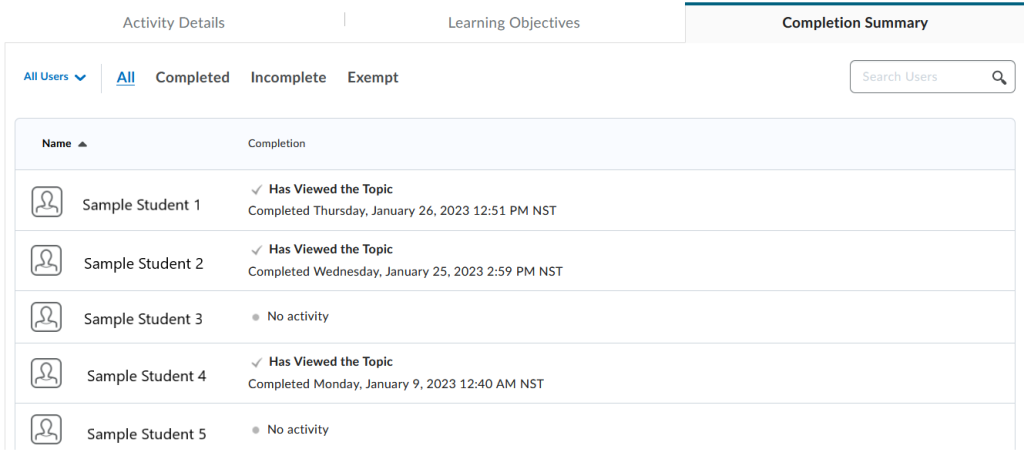
In order to check how students have been engaging with different content topics, proceed as follows:
- In your Brightspace course, click Course Content in the navbar.

- Click the content topic you want to check.
- Scroll to the bottom of the page, and select the Completion Summary tab.

- On the summary page, you will be able to view which students have completed the activity.
Viewing content completion
One progress indicator that requires additional focus is Content Completion. As noted earlier in this resource, the Content Completion indicator allows instructors to track how many required content topics a student has completed, and how much time they spent on each topic.
The default setting for content modules and topics in Brightspace is ‘Not required’. Therefore, if an instructor wishes to track students’ progression through course content, they need to manually change that setting to ‘Required’. Only then will the Brightspace system record information about students’ progression through content.
Tip
A Word of Caution: Tracking the time a student has spent viewing course content in Brightspace should be done with caution since it may not be an accurate reflection of how much the student engaged with the content. Some reasons why time tracking may be inaccurate include:
- A student may download course content and view it on their own device rather than in Brightspace.
- A student may open a content item in a new browser tab for viewing, in which case Brightspace would not record that time.
- If a student loses internet connection while viewing content, the content page may remain open on the screen, but Brightspace would stop measuring time.
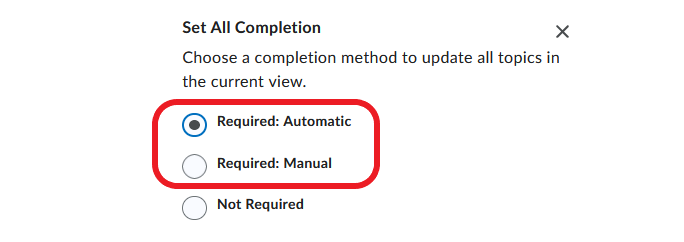
The options for changing content completion settings are Required: Automatic and Required: Manual. Selecting Required: Automatic means that when a student clicks on a content item (module or topic), it will be automatically marked as complete. Selecting Required: Manual means that students will have to manually select a checkbox next to the content item to mark it as complete.
Content completion requirement can be set at the level of 1. a content topic, 2. a content module, or 3. all content at once.
1. Setting completion requirement for a content topic
- In your Brightspace course, click Course Content in the navbar.
- Locate the content topic for which you want to change completion status.
- Click the double dash to the right of the topic title, and select Required from the dropdown menu.
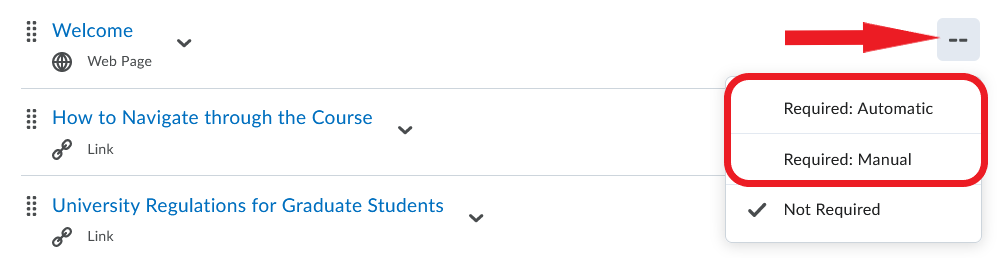
- The double dash will now change to a checkmark, which indicates that the topic is required.

2. Setting completion requirement for a module
- In your Brightspace course, click Course Content in the navbar.
- Under the Table of Contents on the left, select a module.
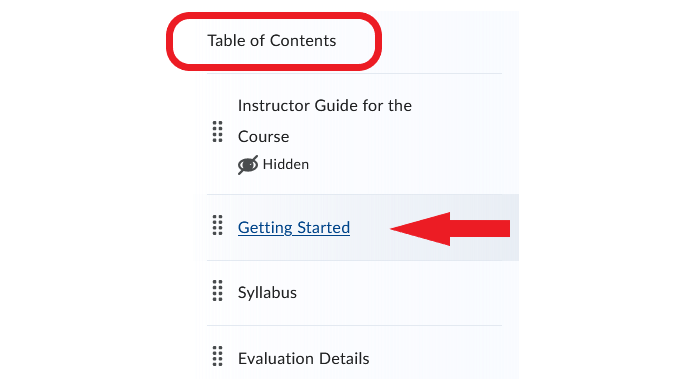
- In the module, click the downward arrow next to the module name. Select Set All Completion from the dropdown menu.
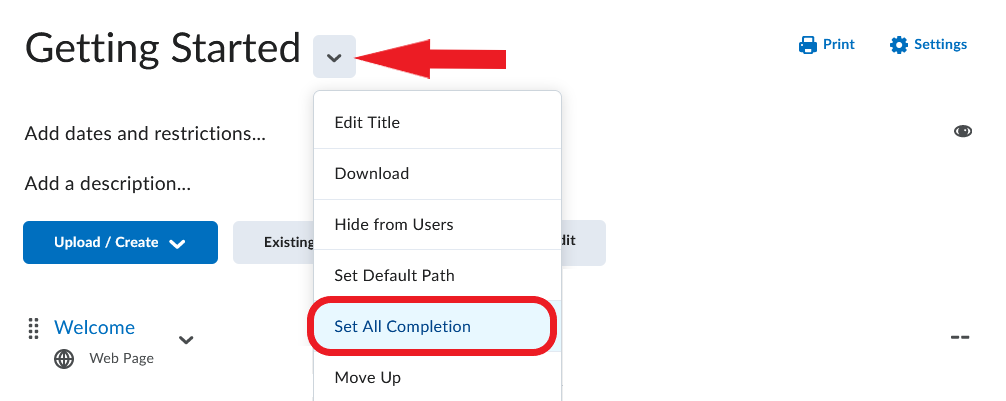
- Click the box under Default Completion Status and select Required Manual or Required Automatic from the menu.
- Click Update.
3. Setting completion requirement for all content at once
- In your Brightspace course, click Course Content in the navbar.
- Click Settings on the right.
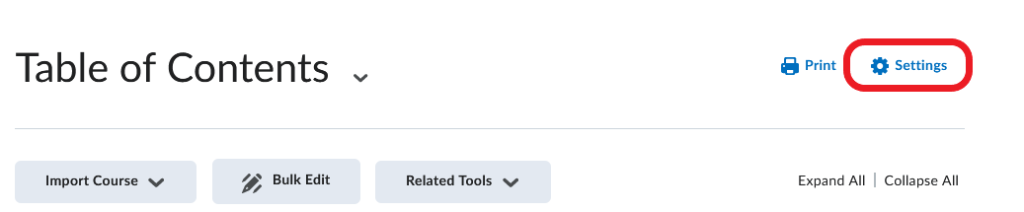
- In the Content Settings window that opens, scroll down to Completion Tracking.
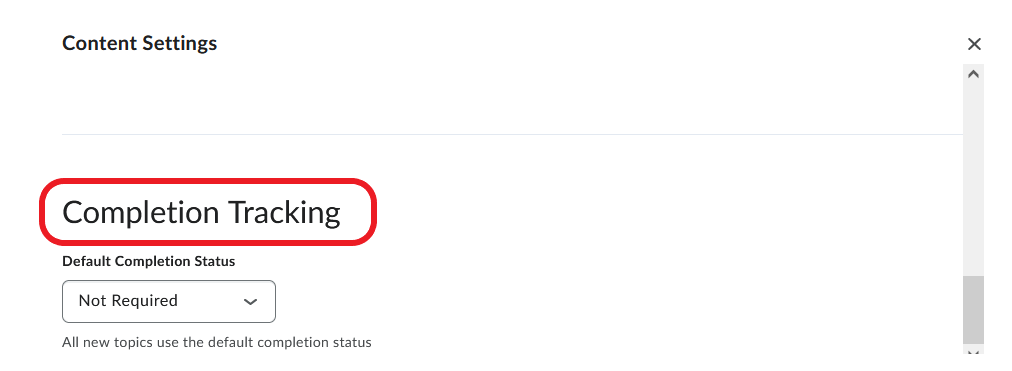
- Click the box under Default Completion Status, and select Required Manual or Required Automatic from the menu.
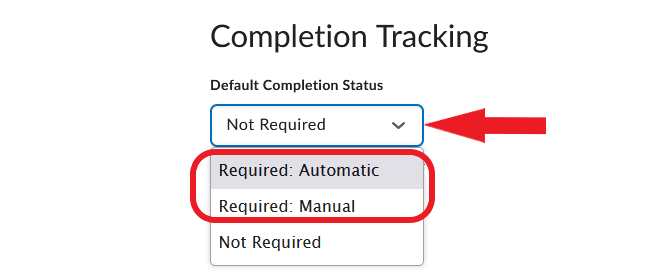
Click Save.
Monitoring course access
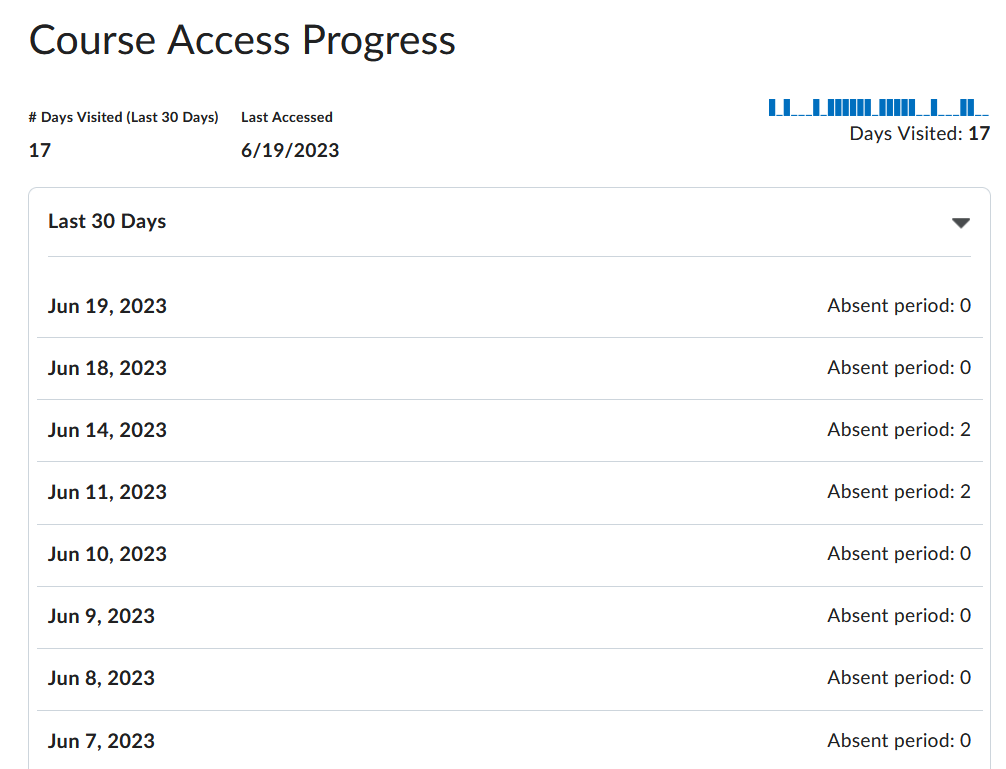
Although Course Access is not an ‘official’ progress indicator, it is possible for an instructors to check when students have accessed a course.
- Log in to Brightspace using your MUN credentials.
- Navigate to your course site.
- In the course navbar, go to Course Admin.
- Select Class Progress from the available tools.
- Click on the name of the student whose Course Access you wish to check.
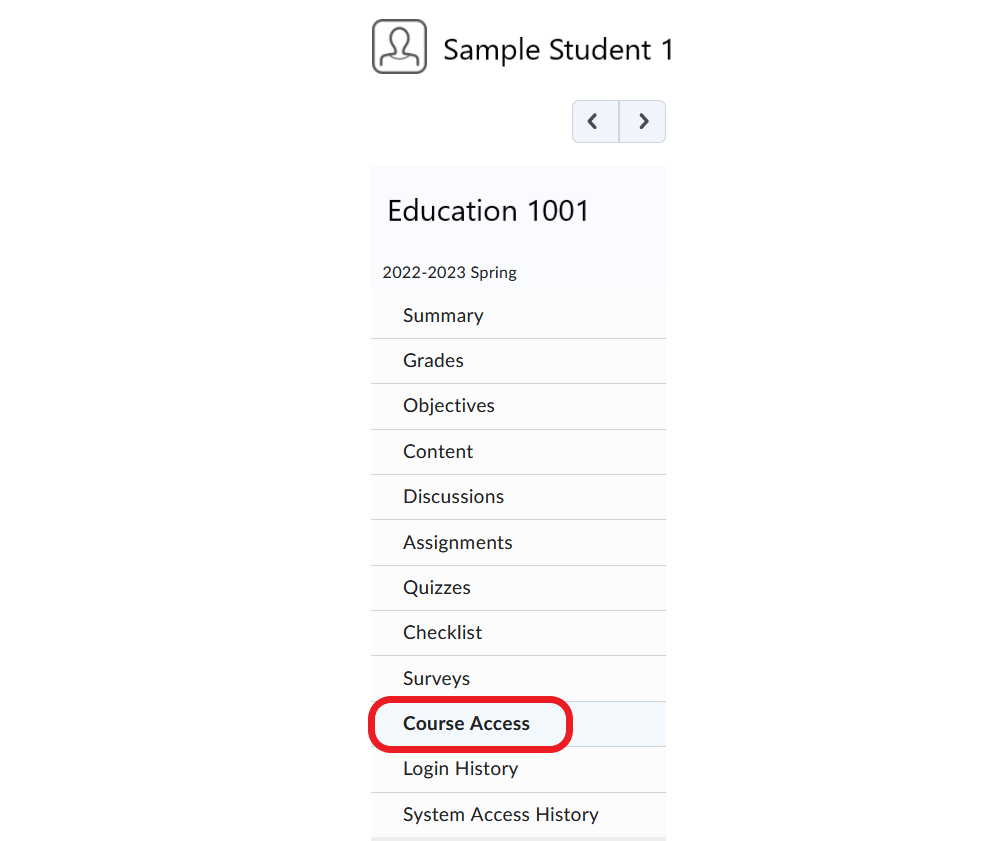
- In the menu on the left, click Course Access.
- The selected student’s course access over the last 30 days will display.
Video Instructions
You can refer to this short video for an overview of the Class Progress Tool.
Class Progress Tool