Mersive Solstice
The Mersive Solstice is a wireless collaboration system installed in various classrooms and meeting rooms across the Memorial campus. Instructors can wirelessly connect to it from a variety of devices and share content to its connected display.
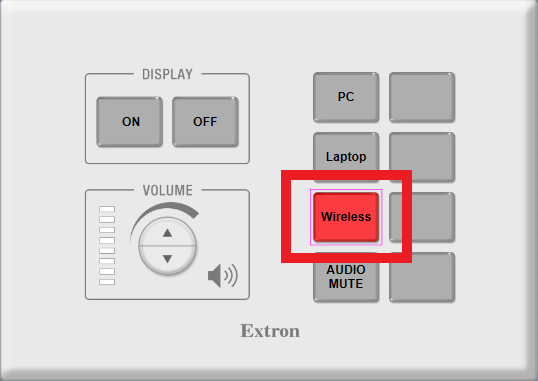
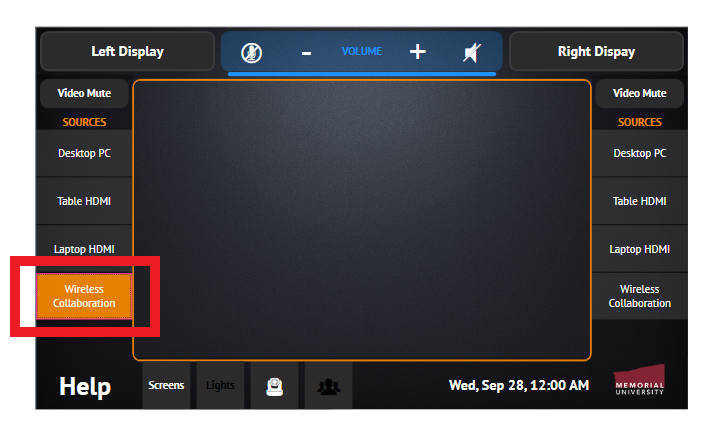
Mersive Solstice is available in rooms with button-based and touchscreen control systems under the ‘Wireless’ or ‘Wireless Collaboration’ input option, as illustrated in the image below.
Instructional Use Cases
Wireless Lecturing: The Solstice allows you – the instructor – to share your whole screen or specific content wirelessly from your device. This frees you from having to worry about cable adapters or being tethered to the presentation desk during your lecture. With a tablet, for example, you could navigate your presentation materials as you walk around the classroom and engage with your students.
Multi-Device Presentations: The Solstice can help with in-class student or group presentations. Typically, each presenter or group representative would have to connect their device, present to the class, and then disconnect to allow the next student or group to present. With Solstice, all students can connect wirelessly and share their content when ready, with little to no delay between presentations. You can also showcase their work simultaneously on-screen if needed.
Collaboration: Solstice has the ability for each connected user to annotate or use a pointer on the content from multiple devices shared on the Solstice. This is a great feature for collaboration. Multiple posts can be shared simultaneously for further group review and revision.
Using Mersive
Below you can find step-by-step instruction for using Mersive Solstice. Click on each menu item to expand.
Download the Mersive app on your mobile device
In order to use the Solstice system, you first need to download and install the Mersive Solstice app on your device. There are several ways to do it.
Option 1: Download from website. The main download page on the Mersive website provides all app options: https://www.mersive.com/download/
Option 2: Download from App Store. If you are familiar with the app store for your mobile device, you can search for “Mersive Solstice” to find and install the app.
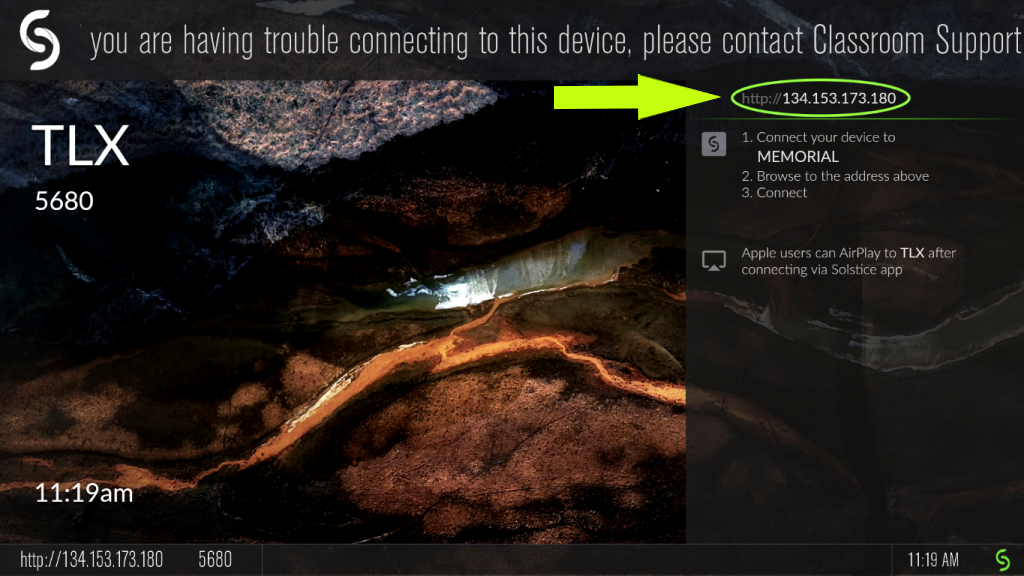
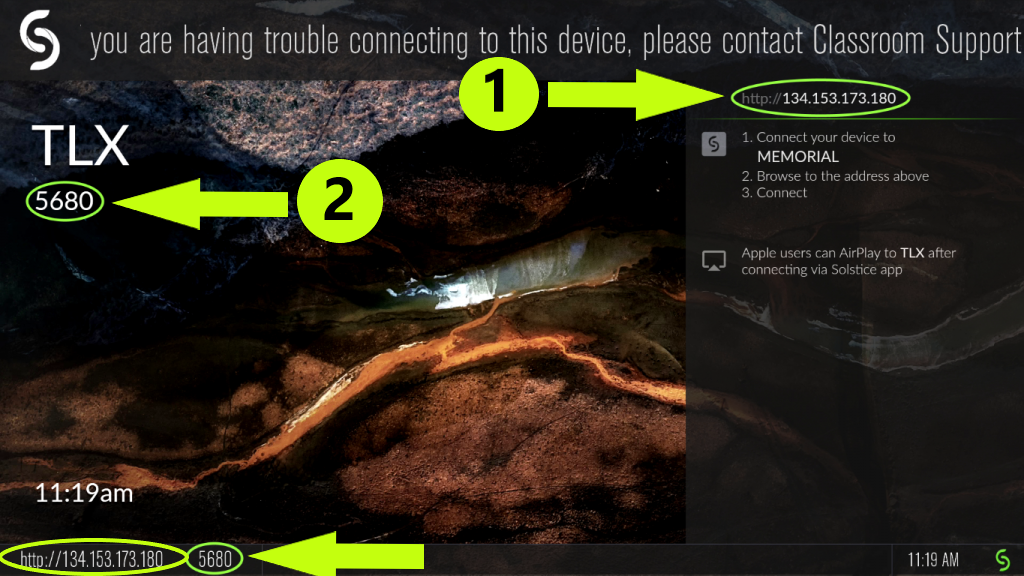
Option 3: Enter the Solstice link in a web browser. When you launch a Solstice session in a classroom/meeting room, the welcome screen will display a URL (see image below). Open a web browser on your device, enter this URL, and you will be redirected to the appropriate version of the Solstice app.
- NOTE: You need to be connected to the MUN wi-fi network to connect to the Solstice URL (not MUN Guest network).
- NOTE: iPad users should use a browser other than Safari; otherwise, the Solstice will direct you to an app version meant for a MacOS device.
Launch Mersive Solstice in the classroom
- In your classroom/meeting room, turn on the display you will be using (projector, large TV – depending on the room).
- On the button-based or touchscreen system used to control the display, volume and other inputs, press ‘Wireless’ or ‘Wireless Collaboration’ to launch the Solstice (images 1 and 2 below).
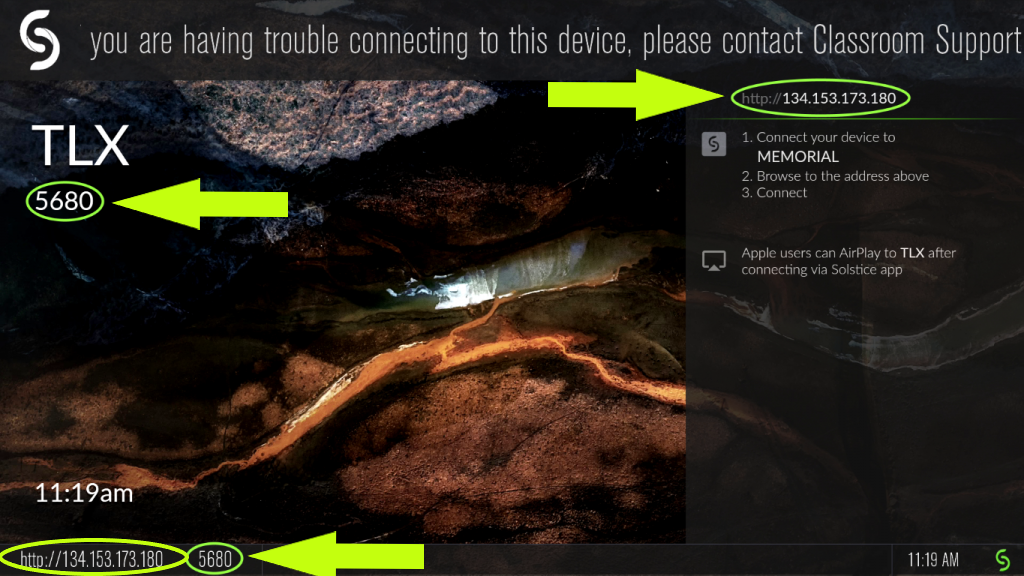
- The welcome screen for the Solstice will display. It will contain the information needed to connect to the session wirelessly.
Connect to a Solstice session from a mobile device
Note
In order to connect to a Solstice session, you need access to the @Memorial wireless network. ‘@Memorial-Guest’ access will not work. A MUN account is needed to connect to the @Memorial Wi-Fi.
Once a Solstice session is launched in the room, instructors need to connect to it from their mobile device. (If the intent is for students to share content and/or collaborate during the session, they also need to connect to the Solstice session the same way.)
- Open the Mersive Solstice App you have previously installed on your device (see above for instructions).
- When prompted, enter the following information:
- the Solstice Link (URL) – the unique URL assigned to the Solstice pod in each room. This URL is fixed (never changes for the room), but each room has a different URL. The URL is located in the top right section of the Solstice welcome screen (see image below).
- Room Code – a randomly generated, 4-digit code assigned to each Solstice session. This number is reset when everyone disconnects from the Solstice session or when the instructor resets the session manually from the Solstice touchscreen display.
- If no content is being shared, the code will appear on the left side of the screen, both at the top and bottom (see image below).
- If content is being shared, the code will not be visible until someone connects; then it will briefly display at the bottom of the screen.
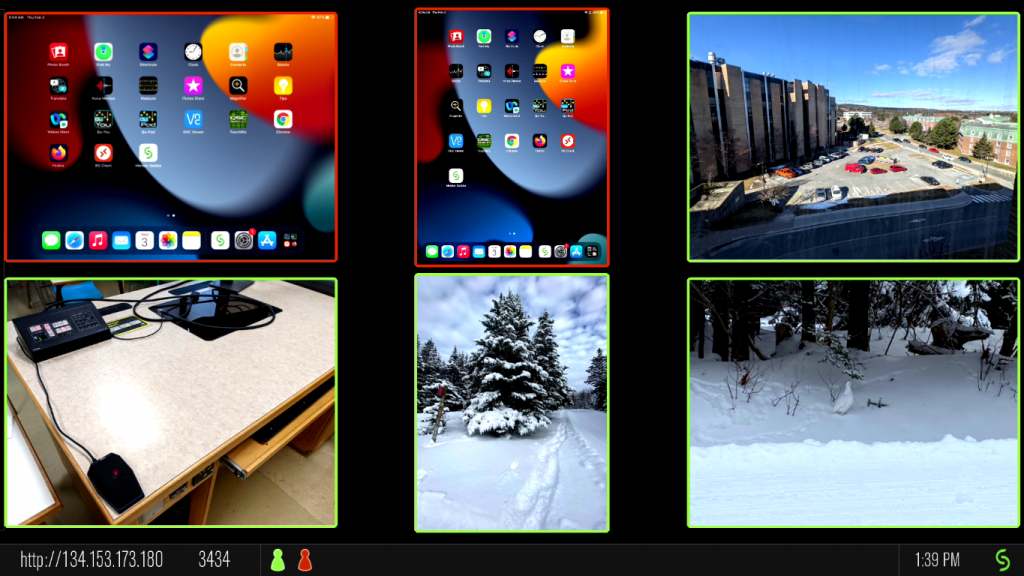
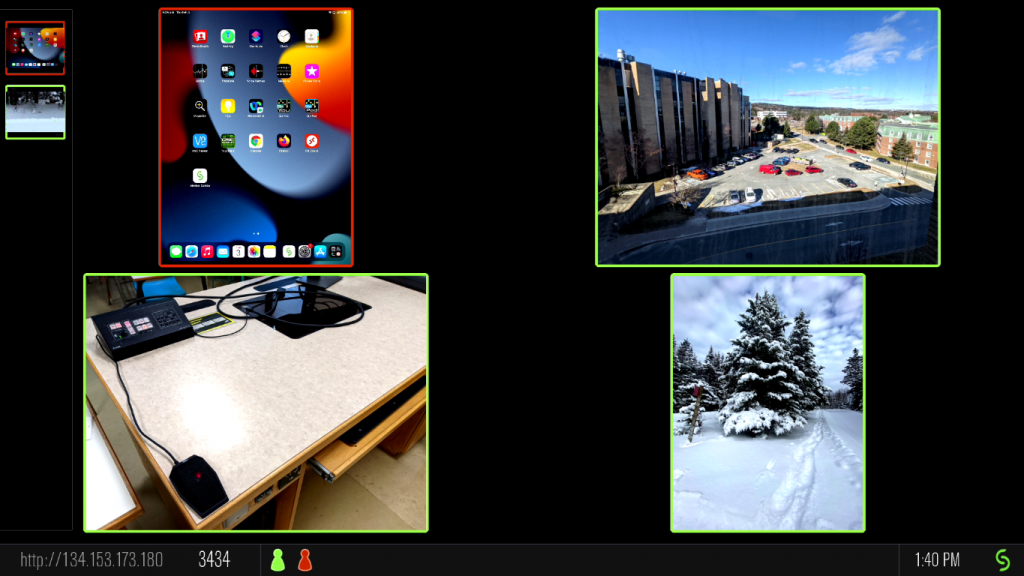
When multiple users connect to a Solstice session, each user is assigned a colour. This colour will be reflected in:
- the user’s avatar at the bottom of the screen
- the border around any content they share
- point or draw commands that they generate.
Share content
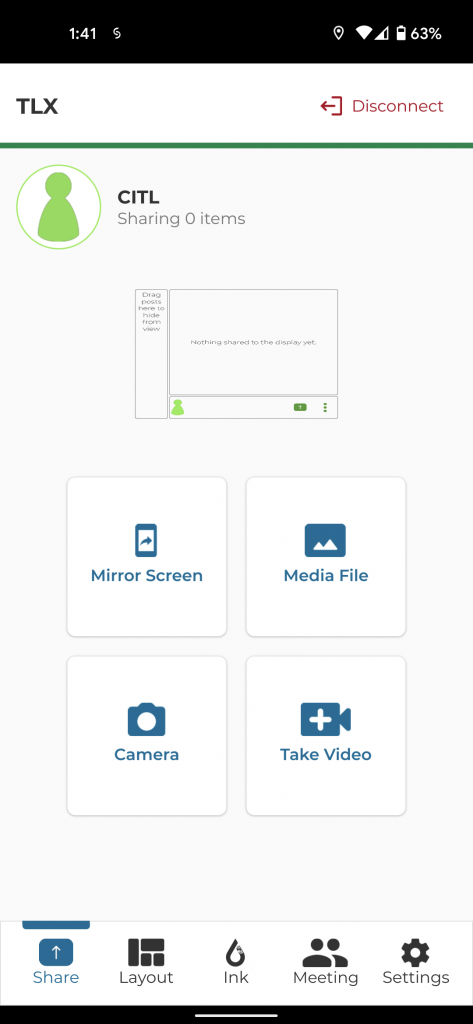
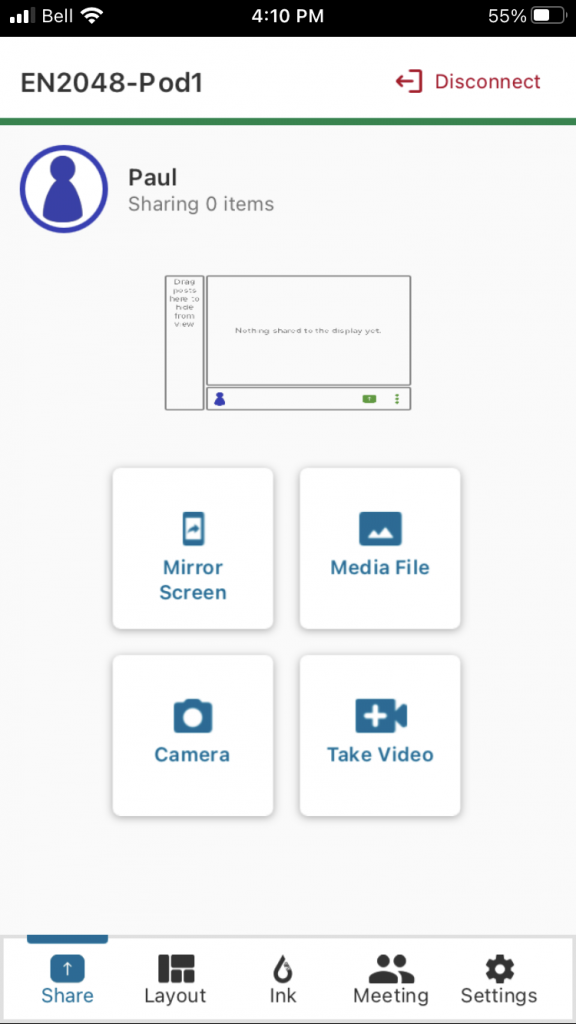
Users connected to a session through the Solstice app can share:
- media files (e.g., pictures, videos),
- real-time views from a camera, or
- the entire screen from the mobile device if they wish to showcase particular documents or applications.
Content Sharing from a Mobile Device
The images below illustrate the content sharing interface for different types of devices.
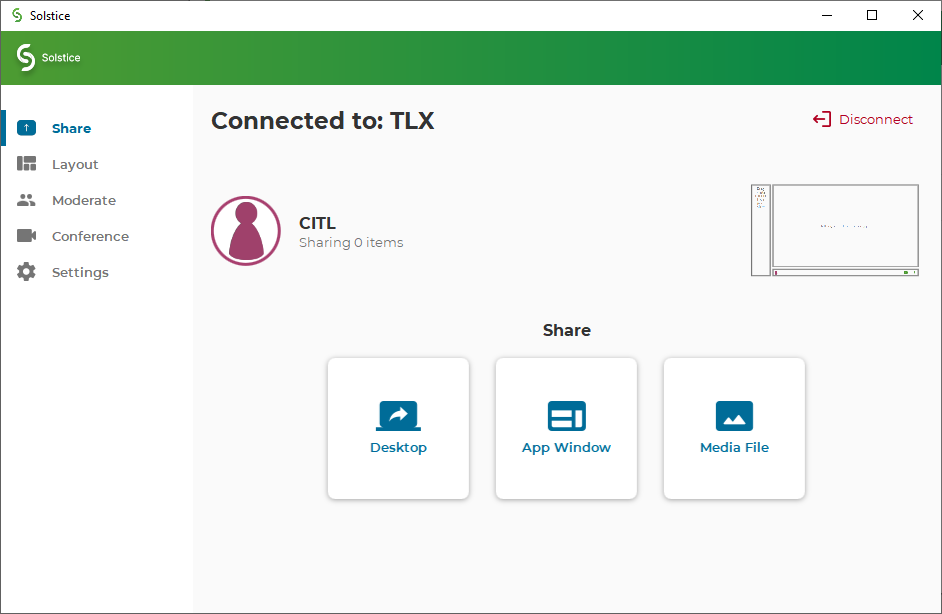
Note
Newer MacOS versions require additional permissions: How to Allow Desktop and Audio Sharing on a Mac.
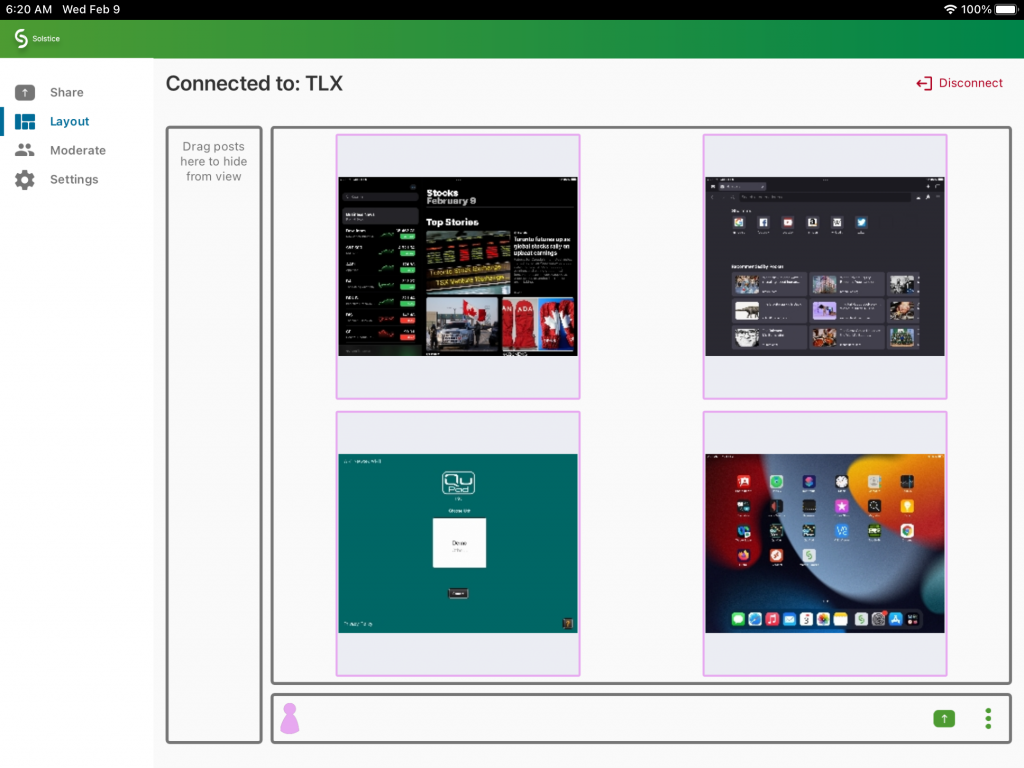
When content is being shared to the Solstice display, the view on a user’s mobile device will be similar to the one below.
Note
For information on how to share your entire screen from various devices visit App-Free Sharing to a Solstice Display.
Content Sharing on the Solstice Display
When multiple pieces of content are shared simultaneously, the display will look like the image below.
Control the content
- Content on the Solstice display can be manipulated with a touchscreen or a mouse.
- Touching/clicking and holding a piece of shared content provides options to ‘Display full-screen’, ‘Delete’ or ‘View additional details’.
- When multiple participants are sharing content, you can control the order in which it is shared.
Note
Every participant connected through a mobile device can control the content on the Solstice display. Rather than having multiple people try to control it simultaneously, consider designating one participant to control the display for everyone.
Organizing Shared Content
You can either share one piece of content at a time on the Solstice display, or you can share multiple pieces simultaneously. If you share multiple pieces, you can organize them on the display so that they remain in a ‘shared’ state and you can easily switch from one to another.
- You can move shared content to the panel on the left, as seen in the image below.
- You can also organize shared content into ‘stacks’, or virtual folders, on the screen.
- To create a stack, click/touch and hold.
- Drag content into the stack as needed.
- Click/touch and hold to edit the stack or unstack all content inside.
The ‘Ink’ Tools
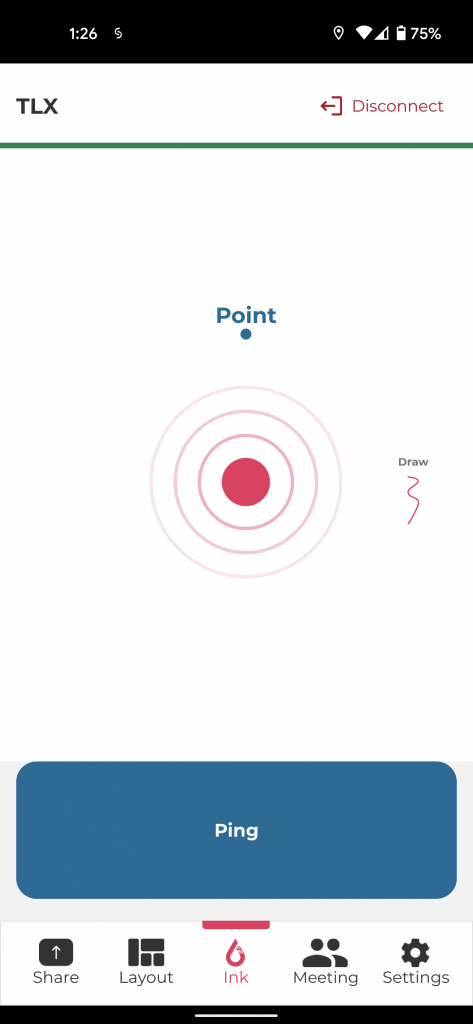
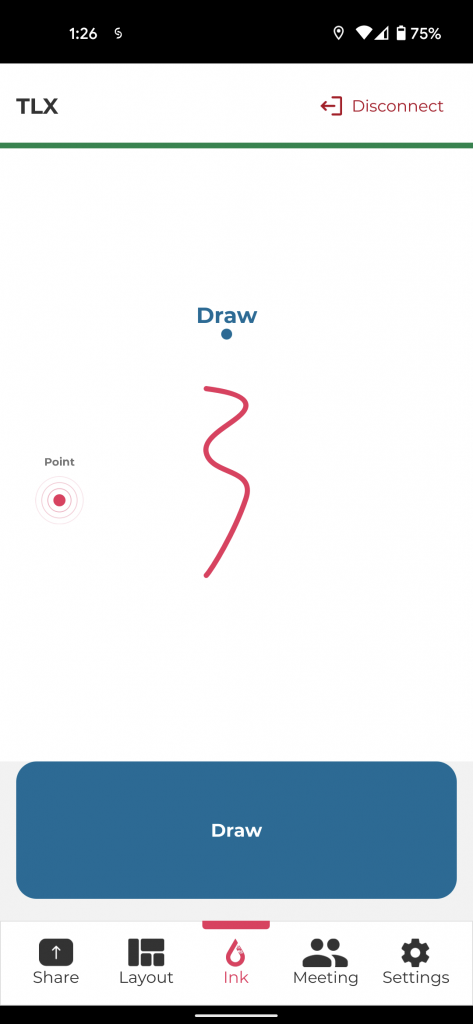
When using a device that supports motion control (e.g., a mobile phone), you have access to two controls that can be used to draw focus on the shared content. These controls are available through the Ink button at the bottom of the Solstice app.
- Pointer (Image 1 below): This feature acts like a laser pointer onscreen. As you touch the screen on your mobile device, a dot in your assigned color (see Multiple Participants in the menu on the left) will move accordingly on the Solstice display. By pressing the Ping button, you can also create ‘a ripple’ around your pointer to draw focus to the content you are referencing.
- Draw (Image 2 below): When the ‘Draw’ button is pushed, touching the screen of your mobile device will create annotations that disappear after a few seconds. This allows for more focus than the ‘Pointer’.
Utilize controls available at the console (not through the app)
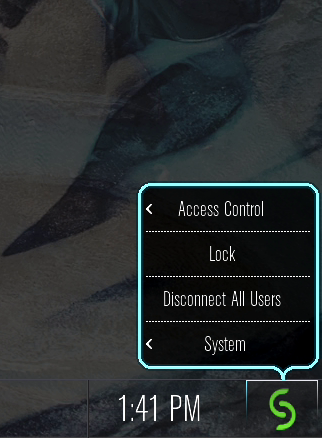
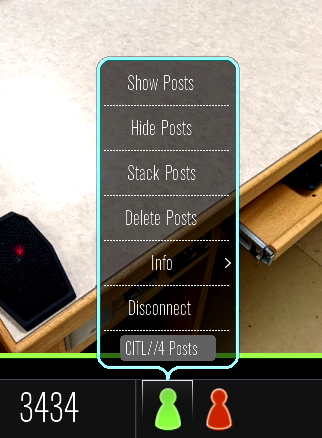
In some classrooms, the instructor has access to additional controls available through the touch monitor at the presentation desk. By pressing on the participant icon (Image 1 below) or the Solstice icon (Image 2 below) at the bottom of the screen, you will have access to the following additional controls:
- Lock the session so that no other users can join.
- End the session so that all users are disconnected and a new room code is generated.
- Show, hide, stack or delete a participant’s shared content from their participant icon.
- Remove individual participants from the session.
End the Solstice session
At the end of each session, instructors should:
- return to the console,
- select the Solstice icon on the touchscreen,
- select Disconnect All Users option.
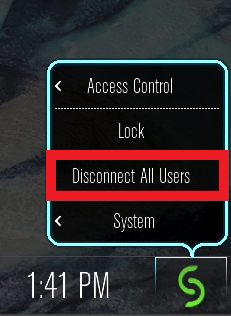
This will ensure that all participants are disconnected and a new room code is generated for the next potential class.
Important considerations
Controlling Content: The content on the Solstice display can be controlled by anyone who is connected to the session. Rather than having multiple people try to control it simultaneously, consider designating one participant to control the display for everyone.
Video Quality: The playback of video on the Solstice depends on the internet connection of the sharing device. A less than ideal connection could result in stuttering video/audio or out-of-sync playback.
Disconnecting from Solstice: While the Solstice does not store files on the device, it is important to disconnect from it when your session is over. If you leave the room but remain connected to the MUN wireless network, you may inadvertently continue to share information to the Mersive Solstice display.
Video Instructions
For more information on use cases and functionality of the Solstice system, please watch the video tutorial below. You can also view this instructional video on YouTube or download the Mersive Solstice User Guide.
Overview of the Mersive Solstice